













Cloud-Based PC Gaming: How a Desktop in the Cloud Changes the Way You Play
A cloud based PC makes this possible by providing access to computing resources hosted in a data center. For gamers, a cloud computer for gaming can offer access to a Windows environment with dedicated graphics resources.
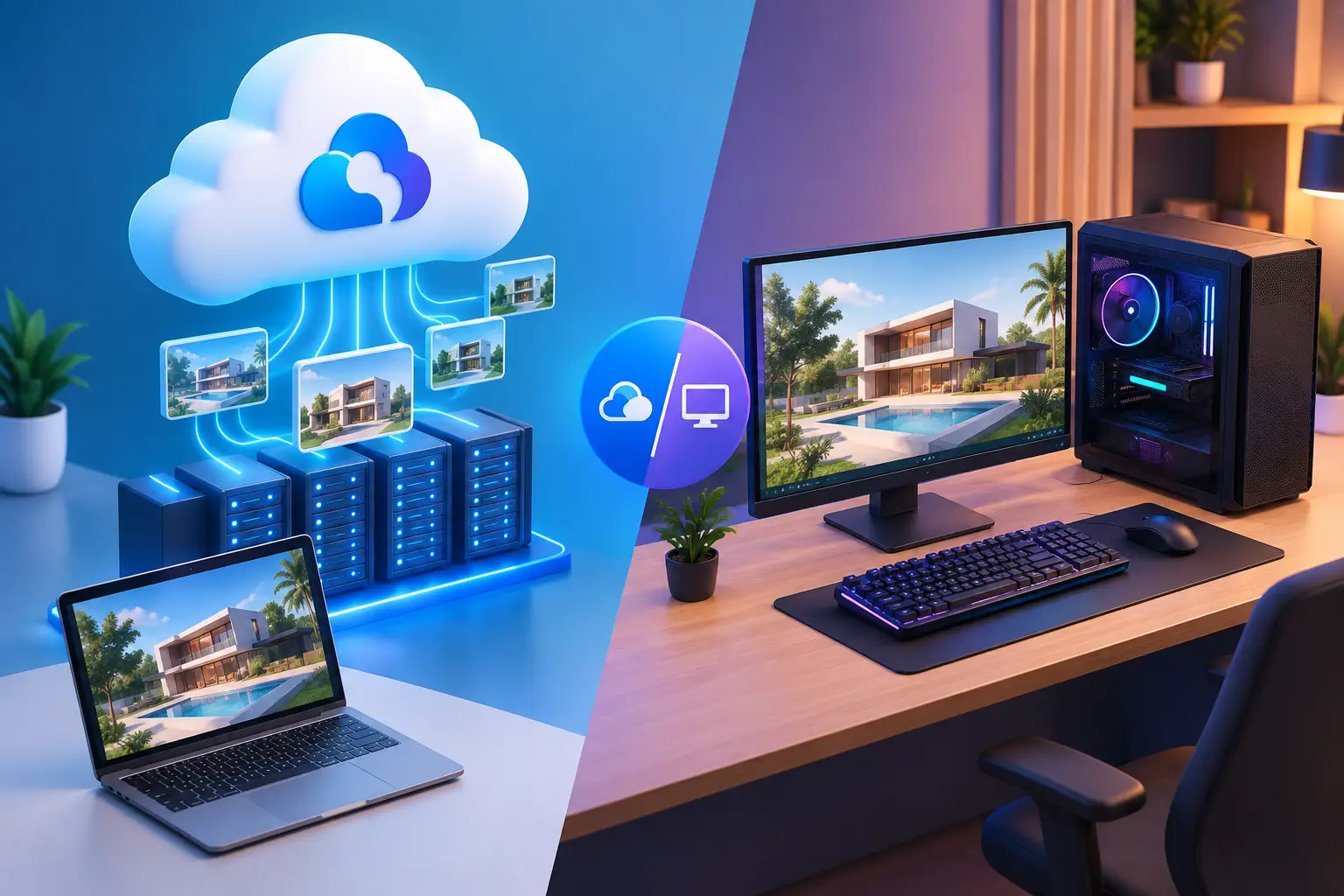
A powerful gaming computer used to require a significant investment in hardware, regular upgrades, and enough physical space for a capable desktop setup. Cloud computing offers another approach: instead of running every game on a computer at home, players can connect to a remote machine that handles the processing and streams the experience to their device.
A cloud-based PC makes this possible by providing access to computing resources hosted in a data center. For gamers, a cloud computer for gaming can offer access to a Windows environment with dedicated graphics resources, while a desktop in the cloud can also support other applications beyond gaming.
This approach is particularly interesting for people who want access to PC gaming resources without immediately purchasing another high-performance computer. Understanding how it works, what affects performance, and how to choose a suitable configuration can help players decide whether cloud gaming fits their needs.
What Is a Cloud-Based PC?
A cloud-based PC is a computer hosted on remote infrastructure and accessed through an internet connection. It provides a desktop environment with computing resources such as a processor, memory, storage, and, depending on the configuration, a graphics processing unit.
Unlike a traditional game-streaming service that offers access to a selected library of games, a full cloud PC provides a more complete computer environment. Users can access the desktop, install compatible software, manage files, and use supported game launchers.
For gaming, this creates a different kind of experience. Instead of relying entirely on the graphics card installed in a local laptop or desktop, the game runs on the remote cloud computer. The visual output is streamed to the player's device.
A cloud-based PC may include:
-
A Windows desktop environment.
-
Dedicated or shared GPU resources, depending on the plan.
-
Configurable CPU and RAM.
-
Cloud-hosted SSD storage.
-
Remote desktop streaming.
-
Support for compatible game launchers.
-
Flexible resource and billing options.
The exact features vary between providers, so it is important to understand whether a service offers a full cloud computer or simply streams games from a fixed catalog.
How Does a Cloud Computer for Gaming Work?
Cloud gaming moves much of the processing away from the player's local hardware. The cloud computer runs the game, renders the graphics, and sends a video stream to the connected device.
The player sends keyboard, mouse, or controller input through the internet. The remote computer processes those actions and returns updated frames.
The process can be understood in five steps.
1. Select a cloud PC configuration
The player chooses a remote computer with suitable CPU, RAM, GPU, storage, and location options. More demanding games or multitasking workloads may require additional resources.
2. Start the remote desktop
The cloud PC is provisioned or launched through the provider's dashboard. Depending on the service, users can connect through a browser or a dedicated remote desktop application.
3. Install or open a compatible game launcher
A full Windows cloud PC can provide access to supported launchers such as Steam and Epic Games Launcher. Players sign in using their own accounts and install games they own or are licensed to access.
4. Run the game remotely
The cloud computer performs the main game processing. Its GPU renders the game, while its CPU and memory support game logic, background applications, and other tasks.
5. Receive the streamed gameplay
The remote system sends the visual output to the local device. The player continues interacting with the game through the remote connection.
Because the entire process depends on network communication, connection quality is an important part of the gaming experience.
Cloud PC Gaming vs. Traditional Game Streaming
Not every cloud gaming service provides the same type of access. Some platforms focus on streaming selected games, while others provide a complete remote desktop.
Understanding the distinction helps players choose the right service.
| Feature | Game-streaming platform | Full cloud gaming PC |
|---|---|---|
| Environment | Provider-managed game platform | Complete remote desktop |
| Game access | Usually selected supported catalog | Compatible games from supported launchers |
| Desktop access | Often limited | Full desktop environment |
| Software installation | Usually restricted | Supported Windows applications can be installed |
| Game management | Platform-dependent | User manages compatible launchers and installations |
| Storage | Often managed by platform | May include persistent SSD storage |
| Other applications | Usually limited | Can support additional desktop workloads |
A catalog-based platform can be convenient for someone who only wants to launch supported games. A full cloud PC may be more appropriate for someone who wants control over a remote Windows environment and their own game installations.
However, a full cloud PC does not guarantee that every PC game will run. Publisher policies, anti-cheat systems, DRM, launchers, and virtualization restrictions can affect compatibility.
What Determines Cloud Gaming Performance?
A cloud computer for gaming needs more than a powerful GPU. Several technical factors work together to determine whether a game feels responsive.
GPU performance
The GPU handles graphics rendering and has a major influence on game performance. Players should check the actual GPU model, available GPU resources, and memory rather than relying only on general descriptions such as high-performance graphics.
Some providers offer dedicated GPU configurations, while others use shared GPU resources. These options can have different performance characteristics.
CPU and RAM
The processor handles game logic, background processes, and other computing tasks. RAM supports the operating system, game assets, launchers, and additional applications.
A configuration with more CPU and memory headroom may be useful for demanding games, multitasking, streaming tools, or running several applications alongside a game.
Network latency
Latency measures the delay involved in sending information between the player's device and the remote computer. In fast-paced games, additional delay can make aiming, movement, and other actions feel less immediate.
Choosing a data-center location closer to the player can help reduce network distance. Actual results also depend on routing, internet service quality, and network congestion.
Connection stability
A high download speed alone does not guarantee a good cloud gaming experience. Packet loss, unstable Wi-Fi, jitter, and interruptions can cause visual artifacts or inconsistent input response.
For a more stable connection, players can consider:
-
Using wired Ethernet when available.
-
Connecting through a strong 5 GHz Wi-Fi or Wi-Fi 6 network.
-
Reducing competing network activity.
-
Selecting the closest available cloud PC region.
-
Testing performance during the hours they normally play.
Streaming technology
The remote desktop protocol affects how the game stream is delivered. Browser access may offer convenience, while a native desktop client can provide a different streaming experience.
Compare the provider's supported connection methods and test them with the games you actually play.
Why Choose a Desktop in the Cloud Instead of Buying Another Gaming PC?
A cloud desktop is not necessarily a replacement for every local gaming computer. It offers an alternative for players whose needs, budgets, or hardware situations make remote computing attractive.
Avoid an immediate hardware upgrade
A player with an older laptop may want to run a demanding game without immediately purchasing a new GPU or replacing the entire computer. A suitable cloud PC can provide access to remote computing resources through the existing device.
Access a consistent gaming environment
A cloud PC with persistent storage can retain installed games, launchers, settings, and files between sessions, depending on the provider's storage and deletion policies.
This can reduce the need to repeatedly download and configure the same software.
Use more than one supported device
A desktop in the cloud separates the computing environment from the device used to access it. This can make it possible to connect from different supported computers, such as a home desktop and a laptop.
The available streaming methods and device compatibility still depend on the provider.
Pay according to usage
Some cloud PC services offer hourly, daily, or monthly billing. This can be useful for players whose gaming schedules vary.
Before choosing a plan, check whether compute and storage are billed separately, what happens when the PC is stopped, and whether there are daily or monthly usage limits.
What to Look for When Choosing a Cloud Computer for Gaming
Choosing a provider involves comparing the entire service rather than looking at one hardware specification.
1. Check the GPU configuration. Find out whether the GPU is dedicated or shared, what model is used, and how much graphics memory is available.
2. Review CPU and RAM options. Match the configuration to your games and any additional applications you plan to run.
3. Check game compatibility. Verify whether your preferred games, launchers, DRM systems, and anti-cheat tools support the provider's virtual environment.
4. Compare storage options. Modern games can require substantial disk space. Check the included SSD capacity and whether storage persists between sessions.
5. Choose a nearby region. A closer data center can improve responsiveness, although network routing and connection quality also matter.
6. Understand the billing model. Compare hourly, daily, and monthly costs, along with storage charges and resource shutdown rules.
7. Test the streaming experience. Where possible, evaluate the service using your own internet connection before relying on it for competitive or latency-sensitive games.
How SensePC Provides a Full Cloud Gaming PC
SensePC offers a configurable cloud computer designed for gaming and other computing workloads. Rather than providing only a fixed game catalog, the platform gives users access to a Windows 11 cloud PC where they can sign in to supported launchers and manage their own compatible software.
Its Xtreme gaming configurations use NVIDIA L4 graphics with 24 GB of GPU memory. Users can choose between three configurations:
-
Xtreme Core: 4 vCPU, 16 GB RAM, and starting SSD storage of 220 GB.
-
Xtreme Pro: 8 vCPU, 32 GB RAM, and starting SSD storage of 500 GB.
-
Xtreme Ultra: 16 vCPU, 64 GB RAM, and starting SSD storage of 500 GB.
Steam and Epic Games Launcher are ready on Xtreme plans. Players use their own accounts and install games they own or are licensed to access. Game compatibility varies, so launcher availability should not be treated as a guarantee that every title will work.
SensePC also provides persistent SSD storage, allowing installed games, launchers, settings, and files to remain available between sessions while the PC and attached storage remain allocated. Users should back up important files before deleting a cloud PC.
For access, users can start through browser viewing and switch to Performance Mode using the native Amazon DCV client on supported Windows and macOS computers. The best connection experience depends on the player's location, network quality, selected region, configuration, and game.
SensePC offers Hourly, Daily, and Monthly plans. Hourly access is useful for variable sessions, while Daily and Monthly options are designed for different usage patterns. Review the current billing terms and live configuration quote before creating a PC.
Learn more about the platform at SensePC and explore its cloud gaming PC options.
Is Cloud-Based PC Gaming Worth Considering?
Cloud based PC gaming can be a practical option for players who want access to more capable computing resources without purchasing another physical gaming computer. It can also suit users who want a complete remote desktop for gaming, software, and other compatible tasks.
However, the experience depends on several factors: GPU resources, CPU and memory capacity, network latency, connection stability, game compatibility, and the provider's billing model.
Before choosing a service, identify the games you want to play, check their compatibility, and compare the available configurations and regions. A full cloud PC such as SensePC can be useful when flexibility and desktop control matter as much as access to gaming hardware.
The most suitable solution is the one that matches your games, network, budget, and expected usage—not simply the one with the biggest advertised specifications.
What's Your Reaction?
 Like
0
Like
0
 Dislike
0
Dislike
0
 Love
0
Love
0
 Funny
0
Funny
0
 Angry
0
Angry
0
 Sad
0
Sad
0
 Wow
0
Wow
0