





















CSS Anchor Positioning: A New Approach to Building Flexible Web Interfaces
Learn how CSS Anchor Positioning replaces JavaScript positioning logic for tooltips, popovers, dropdowns, and responsive tethered UI components.

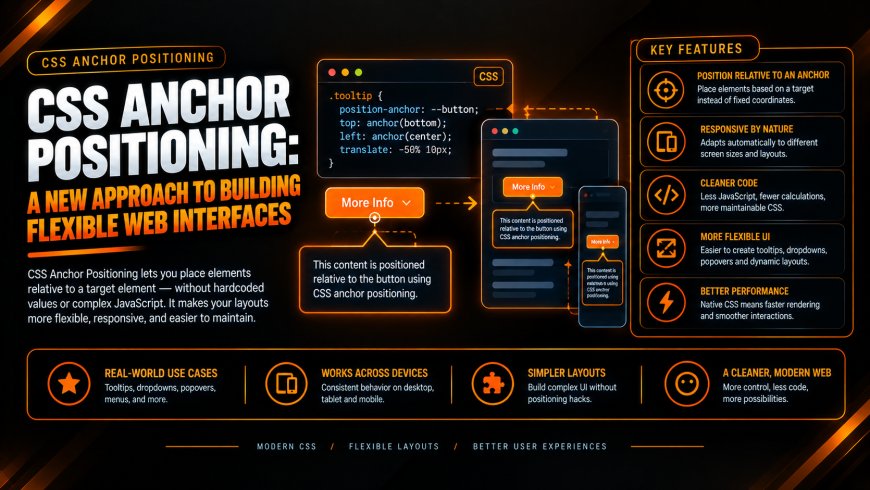
Modern interfaces depend on elements that must remain spatially connected: tooltips follow controls, dropdowns track triggers, and contextual menus respond to changing viewport constraints. Historically, this relationship required JavaScript positioning engines that repeatedly measured DOM geometry, calculated offsets, and reacted to scrolling or resizing. CSS Anchor Positioning moves much of that responsibility into the browser's layout system.
For engineering teams, the significance is architectural. Anchored interfaces can be expressed through declarative CSS rather than imperative geometry calculations. This reduces synchronization work between JavaScript and layout, while giving component libraries a browser-native mechanism for tethered UI component design systems.
Replacing JavaScript Calculation Overhead With Browser-Native Layout Logic
Positioning libraries such as Popper.js and Floating UI solve a legitimate problem, but their traditional approach can require continuous coordination between application code and browser layout. A component may need to read bounding rectangles, calculate offsets, detect viewport boundaries, and write new styles. Repeated reads and writes can contribute to forced synchronous layout and JavaScript layout thrashing, particularly when many overlays are active.
CSS anchor positioning allows the browser to resolve spatial relationships during layout. An anchored tooltip can reference the geometry of its associated element without requiring application code to calculate its coordinates on every scroll event. The browser can also evaluate fallback positions when available space changes.
This matters for Web Development teams managing interaction-heavy applications. Less positioning logic can mean fewer event handlers, reduced client-side coordination, and a smaller runtime responsibility for UI placement. The web developer retains control over component behavior while delegating geometric resolution to the layout engine.
Elevating Component Modularity and Interoperability Across Enterprise Platforms
Declarative anchoring changes how overlay components relate to document structure. Instead of requiring an overlay to remain near its trigger in the DOM, an interface can establish an explicit anchor relationship through CSS. That separation is valuable for component libraries where markup may vary across frameworks, applications, and rendering strategies.
A modern web developer can define an anchor contract at the component level, then allow the overlay implementation to consume that relationship independently. This supports encapsulated dropdowns, menus, instructional callouts, and floating controls without coupling their visual placement to a specific DOM hierarchy.
For enterprise Web Development environments, that abstraction can simplify shared component packages. React, Vue, Angular, and framework-independent systems can maintain consistent positioning concepts while their rendering architectures differ. It also gives web design systems a cleaner mechanism for responsive overlays because positioning rules remain close to presentation logic rather than being scattered across application utilities.
Core Operational Pillars of Native Anchor Implementation
Native implementation depends on a small set of CSS relationships. Engineering teams should establish these deliberately before migrating existing positioning utilities.
- Assign a unique anchor identifier to the target element with the anchor-name property. This creates the reference that an associated positioned element can consume.
- Connect the overlay to its target with position-anchor. The anchor() function can then reference anchor dimensions and edges such as top, bottom, left, and right.
- Define collision behavior through @position-try rules. These rules provide alternative placement strategies when the preferred position cannot fit within the available viewport space.
- Use position-try-fallbacks to declare additional placement options. This enables automatic flipping or alternative alignment without custom viewport calculations.
- Establish predictable component contracts. Anchor identifiers should remain unique, fallback behavior should be tested against constrained viewports, and positioning rules should remain isolated from unrelated layout logic.
Integrating Native Anchor Rules With the HTML Popover API and Top-Layer Elements
CSS anchor positioning becomes particularly useful when combined with the native Popover API. Popover elements can participate in browser-managed interaction behavior while CSS determines their spatial relationship with an anchor. This separates interaction state from placement mechanics.
Top-layer rendering also changes the stacking model. Popovers and dialog-based interfaces can render above ordinary document content without requiring increasingly complex z-index hierarchies. When anchor coordinates are combined with top-layer behavior, a contextual overlay can remain associated with its trigger even when the trigger exists inside a complicated stacking environment.
For web design systems, this pairing provides a native foundation for menus, command surfaces, contextual help, and floating controls. It reduces dependence on manual JavaScript intervention while allowing the browser to respond to viewport constraints. The result is a cleaner interaction model for components that must remain visually tethered across responsive states.
Modernizing Interactive UI Frameworks for Long-Term Maintenance
CSS Anchor Positioning represents an architectural shift in how interactive placement can be implemented. Instead of maintaining geometry utilities, scroll observers, resize calculations, and repeated style updates, teams can express spatial relationships through native CSS rules.
That can reduce bundle responsibilities and simplify maintenance, particularly in design systems containing dozens of overlay variants. It can also reduce the amount of coordination required between JavaScript state and browser layout. The practical gain is not simply fewer lines of code. It is a clearer division of responsibility between application behavior and the rendering engine.
For Web Development leaders, migration should be evaluated component by component. Existing tooltip positioning, dropdown collision logic, flyout menus, and contextual overlays should be measured against browser support requirements before replacement. A disciplined migration can preserve established interaction contracts while removing unnecessary positioning infrastructure.
Modern web design architecture increasingly benefits from platform capabilities that directly address recurring UI problems. CSS anchor positioning provides one such capability, particularly for systems built around tethered interfaces and reusable components.
Engineering leads, product managers, and design system teams should audit their interactive UI components, identify JavaScript-based positioning dependencies, and modernize their positioning architecture with native CSS anchor features where browser support permits.
What's Your Reaction?
 Like
0
Like
0
 Dislike
0
Dislike
0
 Love
0
Love
0
 Funny
0
Funny
0
 Angry
0
Angry
0
 Sad
0
Sad
0
 Wow
0
Wow
0