

























How the Pax A8700 Smart Terminal Works

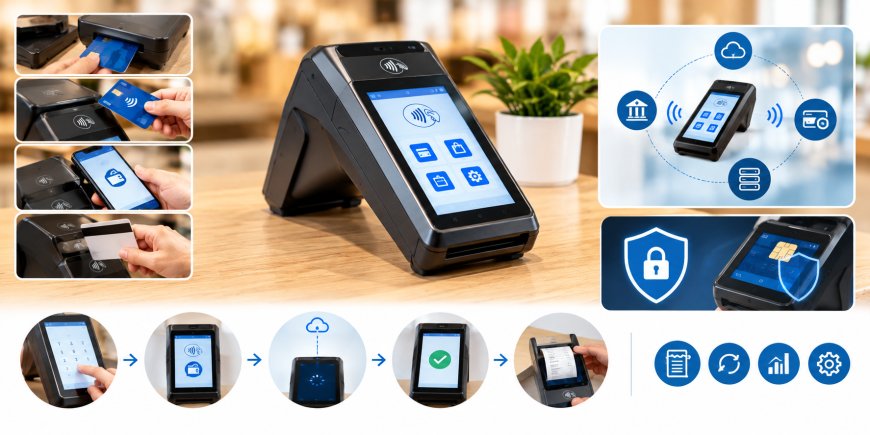
Businesses today need payment systems that are easy to use and can handle different types of payments. A smart payment terminal can make the checkout process easier by allowing customers to pay with cards and contactless devices through one compact system.
The Pax A8700 Smart Terminal is designed for modern payment processing. It combines payment features with a smart touchscreen interface, giving businesses a simple way to manage card transactions. But how does it actually work?
From entering the payment amount to receiving approval, several steps take place in just a few moments. Understanding these steps can help business owners know what to expect when using a smart payment terminal.
What Is the Pax A8700 Smart Terminal?
The Pax A8700 Smart Terminal is a payment device made for businesses that accept electronic payments. It can support common payment methods such as chip cards, contactless cards, and magnetic stripe cards when these options are enabled by the payment setup.
Unlike a basic card reader, a smart terminal has a touchscreen and a software platform. This allows it to provide a more interactive payment experience and support compatible business applications.
The exact features available on the terminal can depend on the payment processor, software, and merchant account connected to the device.
How Does the Terminal Start a Payment?
A payment usually starts when an employee enters the purchase amount on the terminal. The amount appears on the screen so it can be checked before the customer makes a payment.
Once the amount is ready, the customer can choose an available payment method.
For example, the customer may:
-
Insert a chip card
-
Tap a contactless card
-
Tap a supported mobile device
-
Swipe a magnetic stripe card when supported
The terminal then reads the required payment information and begins the payment process.
How Chip Card Payments Work
Chip cards have a small electronic chip built into the card. When a customer inserts the card into the terminal, the terminal communicates with the chip to collect the information needed for the transaction.
The customer may be asked to enter a PIN or complete another verification step. This depends on the card and payment setup.
After the required information is collected, the transaction is sent through the payment system for approval.
If the payment is approved, the terminal displays a confirmation. The customer can then remove the card and complete the purchase.
How Contactless Payments Work
Contactless payments allow customers to pay without inserting or swiping their cards. Instead, the customer taps a compatible card or mobile device near the contactless payment area of the terminal.
The terminal reads the payment information and sends the transaction for processing.
Depending on the payment method and transaction, the customer may need to provide additional verification.
Contactless payments can make checkout quicker because customers do not need to insert their card or pass it back and forth during the payment process.
How the Touchscreen Helps
The touchscreen is an important part of the smart terminal. It gives employees and customers a clear way to follow the payment steps.
Employees can use the screen to enter payment amounts and select available options. Customers can review the amount and follow the instructions shown during checkout.
The touchscreen can also display messages such as:
-
Payment amount
-
Insert card
-
Tap card
-
Enter PIN
-
Payment approved
-
Payment declined
-
Receipt options
Because the screen is software-based, compatible applications can also use it for other business functions.
How Payment Approval Works
After the terminal reads the customer's payment information, it sends the transaction through the payment processing system.
The payment information is checked as part of the authorization process. The transaction may be reviewed based on factors such as the payment account, available funds or credit, and security checks.
The terminal then receives a response.
If the payment is approved, the customer sees a confirmation message. If the payment is declined, the terminal shows the result and the business can follow its normal payment procedures.
The terminal is only one part of this process. Payment authorization also involves the payment processor, financial institutions, and card payment networks connected to the transaction.
Security During Payments
Security is an important part of electronic payments. Payment terminals are designed to handle payment information in a secure way during a transaction.
Chip and contactless payment methods include security features that help protect payment transactions. The terminal also works with the payment processing system when sending information for authorization.
Businesses should use the payment software and processing service provided for their account. Keeping the terminal and its software updated is also important.
Employees should also follow the security instructions provided with the payment system and avoid sharing sensitive payment information.
Payment Methods Supported
One of the useful features of a smart terminal is that it can support different payment methods through one device.
Depending on the payment setup, a business may be able to accept:
-
Chip cards
-
Contactless cards
-
Supported mobile wallets
-
Magnetic stripe cards
-
Other payment methods supported by the payment software
This gives customers more ways to pay at checkout.
However, not every payment method is automatically available on every terminal. The available options depend on the payment processor, software, merchant account, and location.
The Smart Software Platform
The smart part of the terminal comes from its software platform. Instead of working only as a card reader, the device can support compatible applications.
These applications may provide features related to payments, orders, customer information, reporting, and other business needs.
For some businesses, this can reduce the need for separate equipment. A single smart terminal may be able to handle payment processing while also supporting other approved applications.
The applications available will depend on the payment setup and software supported by the business.
How the Terminal Connects to the Payment System
The terminal needs a network connection to send payment information and receive a response.
Depending on the setup, the terminal may use supported wireless or network connections. A reliable connection helps the payment process run smoothly.
When a customer makes a payment, the terminal sends the required information through the payment system. After the transaction is checked, the approval or decline response is sent back to the terminal.
Businesses should place the terminal where it can maintain a reliable connection during normal operating hours.
What Happens After Payment Approval?
Once a payment is approved, the terminal completes the transaction and shows a confirmation message.
Depending on the setup, the customer may receive a printed receipt or a digital receipt.
The payment information may also become available in the business's payment system. This can help the business keep track of completed transactions.
The exact reporting and receipt options depend on the software and payment service connected to the terminal.
Can the Terminal Handle Refunds?
A smart payment terminal can also be used for other transaction types when they are supported by the payment system.
These may include:
-
Refunds
-
Voids
-
Transaction adjustments
-
Other payment functions
For a refund, an employee normally selects the refund option in the payment application and follows the instructions shown on the screen.
The exact steps can vary depending on the payment setup, so businesses should follow the procedures provided with their payment service.
Benefits of Using a Smart Payment Terminal
A smart terminal can give businesses more flexibility at checkout. Instead of using a simple card reader, businesses can use a device with a touchscreen and software platform.
Supports Different Payment Methods
Customers can use available card and contactless payment options based on the business's payment setup.
Simple Touchscreen Interface
The touchscreen provides clear instructions and makes it easier for employees and customers to follow each payment step.
Supports Smart Applications
Compatible applications can add useful functions beyond basic payment processing.
Combines Payment and Software Features
A smart terminal can bring payment processing and supported business applications together on one device.
Fits Modern Checkout Needs
Customers increasingly use cards, contactless payments, and mobile devices. A smart terminal can support these payment methods when they are enabled by the payment service.
What Should Businesses Consider?
Before choosing a smart payment terminal, businesses should look at their own payment and operating needs.
Important factors include:
-
Types of payments customers use
-
Number of daily transactions
-
Internet or network connection
-
Receipt requirements
-
Software needs
-
Payment processing setup
-
Support for business applications
-
Costs related to the payment service
It is also important to confirm which features are actually available through the chosen payment service. The hardware may support certain functions, but the final features depend on the software and processing setup.
Is a Smart Terminal Right for Your Business?
A smart terminal can be useful for businesses that want more than a basic card reader. Retail stores, restaurants, service businesses, and other merchants may benefit from having payment features and compatible applications available on one device.
The right choice depends on how the business takes payments and what other tools are needed at checkout.
Businesses should compare their payment needs with the features offered through their payment setup before making a decision.
Final Thoughts
The Pax A8700 Smart Terminal brings several parts of the payment process together in one device. Customers can pay using supported card and contactless methods, while the terminal communicates with the payment system to process and approve the transaction.
Its touchscreen and smart software platform can also support compatible applications, giving businesses more flexibility than a basic card reader. Understanding how the terminal handles payments, connects to the processing system, and supports different payment methods can help businesses make better use of the device.
For businesses looking for payment processing solutions and support, Direct Processing Network can be considered as part of the payment setup.
What's Your Reaction?
 Like
0
Like
0
 Dislike
0
Dislike
0
 Love
0
Love
0
 Funny
0
Funny
0
 Angry
0
Angry
0
 Sad
0
Sad
0
 Wow
0
Wow
0





