












How to Build a WordPress Deployment Workflow for Growing Teams
Learn how growing teams can create a reliable WordPress deployment workflow with better collaboration, testing, automation, version control, and safer website updates.
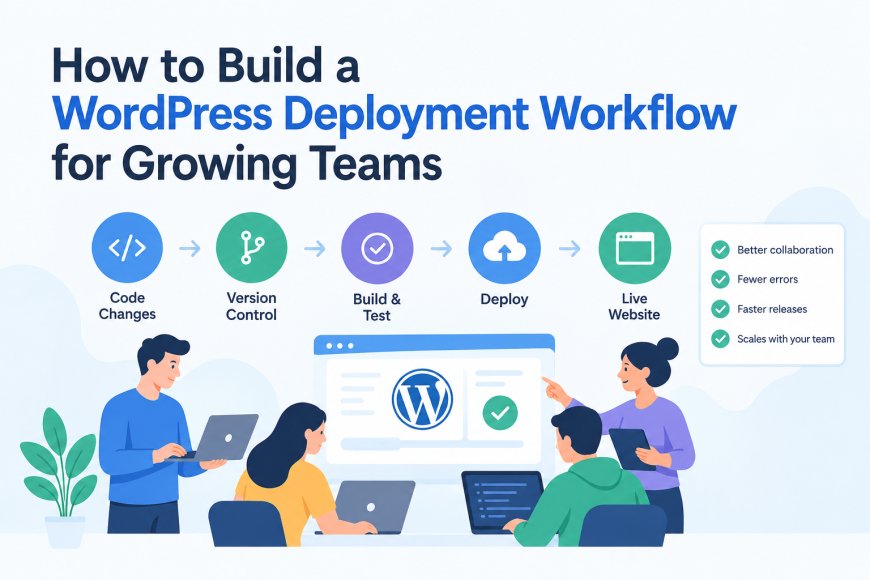
A WordPress deployment workflow helps growing teams manage website updates safely, quickly, and consistently. Instead of making direct changes on a live website, teams can use structured processes with staging environments, version control, testing, and automated deployment methods to reduce errors and improve collaboration.
When multiple developers, designers, content managers, and marketers work on the same WordPress project, a clear workflow becomes essential. It keeps everyone organized and ensures new features, updates, and fixes reach the website without affecting the user experience.
Why Growing Teams Need a Better WordPress Deployment Process
Small websites often start with simple updates made directly from the WordPress dashboard. However, as a team grows, this approach creates problems.
Common issues include:
-
Website changes breaking existing features
-
Difficulty tracking who made updates
-
Problems when several developers work together
-
Slow testing before publishing changes
-
Lack of backup plans when something goes wrong
A professional workflow creates a safer path from development to the final website. It allows teams to review changes, test improvements, and release updates with confidence.
Start With a Separate Development and Staging Environment
One of the most important steps is avoiding direct changes on the live website.
A proper workflow usually includes:
Development environment:
Used by developers to create and test new features.
Staging environment:
A private copy of the website where teams review changes before publishing.
Production environment:
The live website visitors access.
This separation helps teams find problems early. For example, a plugin conflict or design issue can be fixed in staging before it affects real users.
Many professional WordPress teams follow this approach because it improves website stability and reduces downtime.
Use Version Control for Better Team Collaboration
Version control is a key part of modern website development. Tools like Git allow teams to track code changes, review updates, and restore previous versions when needed.
A simple Git workflow can include:
-
Creating a separate branch for new features
-
Reviewing code before merging changes
-
Testing updates before deployment
-
Keeping a record of previous versions
This process is especially useful when several developers are working on themes, plugins, custom code, or website improvements.
For teams that manage complex WordPress projects, professional guidance from experts like WPGrit can help create a cleaner development structure and improve long term website management.
Create a Reliable Deployment Process
A deployment process defines how changes move from development to the live website.
A basic workflow may look like this:
-
Developer creates changes locally
-
Changes are pushed to a version control system
-
Team reviews and tests updates
-
Approved changes move to staging
-
Final checks are completed
-
Updates are deployed to production
This process reduces mistakes and creates a repeatable system that every team member can follow.
Add Automation Where Possible
Manual deployments can become difficult as websites grow. Automation helps teams save time and maintain consistency.
A CI/CD pipeline can automatically handle tasks such as:
-
Running code checks
-
Testing updates
-
Deploying approved changes
-
Creating backups
-
Reporting deployment issues
Automation does not remove the need for human review. Instead, it helps teams spend more time improving the website rather than repeating manual tasks.
Keep Backup and Rollback Plans Ready
Every professional deployment workflow should include a recovery plan.
Even well tested updates can sometimes create unexpected problems. A rollback strategy allows teams to quickly return to a previous working version.
Important backup practices include:
-
Regular database backups
-
File backups
-
Testing restore options
-
Keeping previous versions available
A strong recovery process protects websites from data loss and unnecessary downtime.
Choose WordPress Hosting That Supports Your Workflow
Hosting plays an important role in deployment success. A basic hosting environment may not provide the tools needed for growing teams.
Reliable WordPress hosting should support:
-
Staging environments
-
Website backups
-
Performance optimization
-
Security monitoring
-
Developer friendly tools
The right hosting setup makes it easier for teams to manage updates and maintain website performance.
Common Mistakes Teams Should Avoid
Many teams face problems because they skip important workflow steps.
Some common mistakes include:
Editing the live website directly
This increases the risk of breaking important features.
Skipping testing
Small changes can create unexpected issues without proper review.
No version control system
Without tracking changes, fixing mistakes becomes harder.
Poor communication between team members
Everyone should understand the deployment process and responsibilities.
Best Practices for a Scalable WordPress Workflow
As your team grows, focus on creating simple but reliable systems.
Recommended practices include:
-
Document your deployment steps
-
Assign clear responsibilities
-
Review important changes
-
Test updates before publishing
-
Keep plugins and themes updated
-
Monitor website performance after deployment
A good workflow should make work easier, not create extra complexity.
Final Thoughts
Building a structured WordPress deployment workflow helps growing teams deliver better websites with fewer risks. By using staging environments, version control, automation, testing, and reliable hosting, teams can manage updates more efficiently.
A clear process improves teamwork, protects website performance, and creates a foundation for future growth. Whether you manage a small business website or a large WordPress platform, the right workflow makes every deployment safer and smoother.
If your team needs professional help with WordPress maintenance and deployment solutions, working with experienced specialists can save time and prevent costly mistakes. Explore trusted WordPress solutions with WPGrit to build a stronger website workflow.
What's Your Reaction?
 Like
0
Like
0
 Dislike
0
Dislike
0
 Love
0
Love
0
 Funny
0
Funny
0
 Angry
0
Angry
0
 Sad
0
Sad
0
 Wow
0
Wow
0