













How to Choose a Reliable Office 365 Migration Solution
Learn how to choose a reliable Office 365 migration solution. Compare compatibility, security, features, pricing, and migration support.

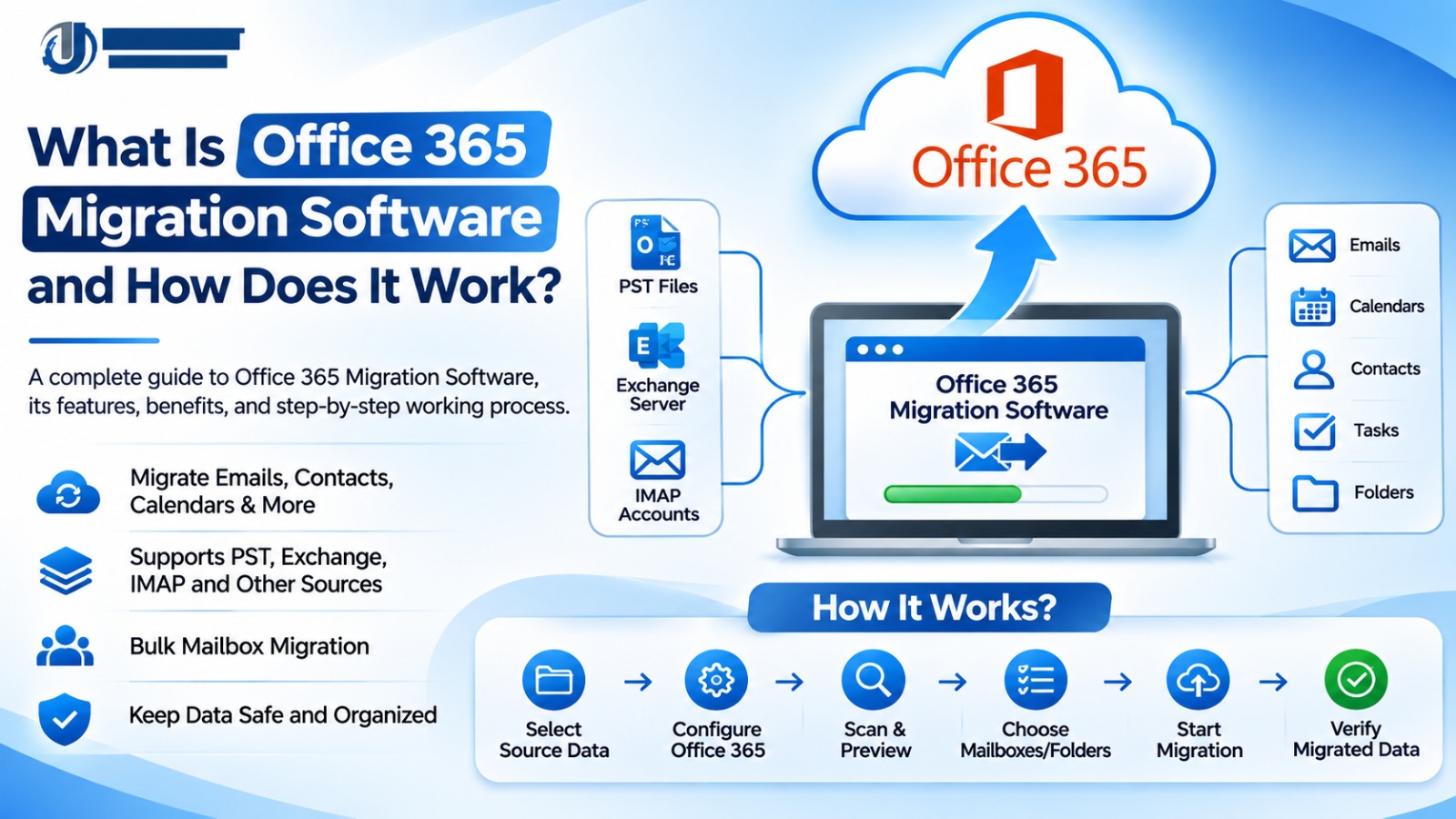
Migrating business email data to Office 365 (Microsoft 365) is an important decision for organizations looking to modernize their email infrastructure. Whether a company is moving from an on-premises Exchange Server, an IMAP email platform, or local Outlook files, selecting the right migration solution can make a significant difference to the project.
A reliable Office 365 migration solution should do more than transfer emails. It should support the required source platforms, protect sensitive information, provide clear migration reports, and help administrators manage the process efficiently.
However, not every migration tool offers the same features, compatibility, or level of support. Choosing software based only on price or promotional claims can lead to unexpected limitations and additional costs.
This guide explains how to choose a reliable Office 365 migration solution, which features to evaluate, and how to avoid common mistakes.
What Is an Office 365 Migration Solution?
An Office 365 migration solution is a method, service, or software application used to transfer supported email data and other information to Microsoft 365.
Depending on the source platform and migration requirements, a solution may support migration from:
-
On-premises Microsoft Exchange Server
-
IMAP-based email services
-
Outlook PST files
-
Other supported email platforms
-
Email backup and archive formats
Migration solutions generally fall into two categories:
Microsoft-native migration methods: Microsoft provides built-in migration options for eligible environments. These may be sufficient for organizations with supported source platforms and straightforward requirements.
Third-party migration software: Specialized applications may offer additional features such as batch processing, mailbox mapping, filtering, and centralized progress monitoring. Capabilities vary by product.
The right choice depends on your source environment, data requirements, project size, budget, and technical resources.
Why Is Choosing a Reliable Migration Solution Important?
Email systems often contain important business information, including customer conversations, invoices, attachments, internal communications, and historical records.
An unsuitable migration approach can create problems such as incomplete transfers, authentication failures, incorrect mailbox mapping, and unexpected downtime.
A reliable solution helps organizations:
-
Plan mailbox transfers more effectively.
-
Manage multiple mailboxes where supported.
-
Monitor migration progress.
-
Identify errors and troubleshoot problems.
-
Protect sensitive information during migration.
-
Verify transferred data before completing the transition.
The goal is not simply to move data quickly. It is to complete the migration accurately and maintain business continuity.
10 Important Factors to Consider When Choosing Office 365 Migration Software
1. Source Platform Compatibility
Compatibility should be the first consideration when evaluating migration software.
Identify where your existing email data is stored. It may be in an Exchange Server, an IMAP account, Outlook PST files, or another email platform.
Check whether the software explicitly supports your source platform and version.
For example, a PST migration tool may not support direct Exchange Server migration. Similarly, an IMAP migration workflow may transfer email messages and folders but not calendars or contacts.
Expert tip: Confirm source and destination compatibility before purchasing or installing the software.
2. Multiple Mailbox Migration
Businesses often need to migrate dozens or hundreds of mailboxes. Manually transferring each account can increase administrative effort.
Look for software that supports bulk or batch mailbox migration if your project requires it.
Evaluate:
-
Number of supported mailboxes
-
Batch processing options
-
Mailbox mapping
-
Account selection
-
Migration scheduling
-
Licensing restrictions
Make sure the software's mailbox limits match your organization's requirements.
3. Data Integrity and Verification
Data integrity is one of the most important migration considerations.
A reliable migration process should allow administrators to review results and identify failed or skipped items.
Check whether the software provides:
-
Migration logs
-
Error reports
-
Folder-level verification
-
Message and attachment transfer information
-
Retry options for failed operations
Do not rely only on a success message. Verify important mailbox data after migration.
4. Data Security and Privacy
Business email can contain confidential customer information, financial records, and internal documents.
Before selecting a migration solution, review how it handles:
-
User credentials
-
Authentication
-
Data encryption
-
Temporary files
-
Access permissions
-
Data retention and deletion
-
Privacy and compliance requirements
Prefer tools that clearly explain their security practices. Avoid applications that request unnecessary permissions or provide unclear information about credential handling.
5. Easy-to-Use Interface
A complicated migration process can increase the chance of configuration mistakes.
Look for a solution with a clear interface and understandable instructions.
Useful interface features may include:
-
Source and destination selection
-
Mailbox selection
-
Mapping configuration
-
Migration progress indicators
-
Error notifications
-
Export or migration reports
An intuitive workflow can help administrators manage migration tasks more efficiently.
6. Filtering and Selective Migration
Some organizations do not need to transfer every email in every mailbox.
Depending on the software, filtering features may allow administrators to select particular folders, date ranges, or supported data categories.
For example, a company may need to migrate recent business communications while retaining older archives separately.
Check the available filtering options and test them with sample data before starting a large migration.
7. Performance and Scalability
Migration speed depends on several factors, including mailbox size, network bandwidth, source-server performance, Microsoft service limits, and software configuration.
For large projects, check whether the solution supports batch processing and whether its documented limits meet your requirements.
Be cautious of claims promising unlimited or instant migration. Request clear technical specifications and test the software using representative mailbox data.
8. Technical Support and Documentation
Technical problems can occur even when migration software is properly configured.
A dependable vendor should provide useful documentation and accessible support channels.
Review:
-
Installation instructions
-
Migration guides
-
Troubleshooting documentation
-
Frequently asked questions
-
Support availability
-
Product update policy
If your organization has a complex migration project, confirm that the vendor can provide assistance for your specific source environment.
9. Transparent Pricing and Licensing
The lowest-priced migration tool is not necessarily the most economical option.
Compare the complete cost, including:
-
Number of licensed users or mailboxes
-
One-time or subscription charges
-
Migration limits
-
Feature restrictions
-
Upgrade costs
-
Technical support charges
-
Additional service fees
Choose a pricing model that matches the size and complexity of your project.
10. Free Trial and Product Evaluation
A free trial can help determine whether a migration solution meets your technical requirements.
Before purchasing, test a small sample of mailbox data.
Evaluate whether the software:
-
Connects to the source environment.
-
Recognizes the required mailbox data.
-
Supports the intended destination.
-
Transfers representative emails and attachments.
-
Displays understandable migration reports.
-
Works within the stated system requirements.
Review trial restrictions carefully. Some trials limit the number of items or disable certain migration functions.
How to Evaluate an Office 365 Migration Solution Before Buying
Use this practical process to compare available options.
Step 1: Identify your migration source. Determine whether the data is stored in Exchange Server, IMAP accounts, PST files, or another supported platform.
Step 2: Define your migration scope. Calculate the number of mailboxes, mailbox sizes, required data types, and expected migration timeline.
Step 3: Shortlist compatible solutions. Compare Microsoft-native methods and third-party tools that support your requirements.
Step 4: Review features and licensing. Check mailbox limits, filtering, reporting, security, and total cost.
Step 5: Test the workflow. Use a free trial or pilot migration where available.
Step 6: Verify migration results. Check messages, folders, attachments, and other supported data.
Step 7: Finalize your selection. Choose the solution that meets your technical, security, operational, and budget requirements.
Common Mistakes to Avoid
Organizations should avoid these mistakes when selecting Office 365 migration software:
-
Choosing a product without checking source compatibility.
-
Comparing tools based only on price.
-
Ignoring mailbox and file-size limits.
-
Assuming every tool transfers calendars, contacts, and mailbox settings.
-
Overlooking security and credential handling.
-
Skipping the free trial or pilot migration.
-
Ignoring licensing restrictions.
-
Starting a large migration without a backup.
-
Failing to verify the destination mailbox data.
A careful evaluation can help prevent unnecessary expenses and migration delays.
Is Third-Party Office 365 Migration Software Always Necessary?
No. Microsoft provides native migration methods for supported environments, including eligible Exchange and IMAP migration scenarios.
These methods may be sufficient when the source environment is compatible and the required migration process is straightforward.
Third-party migration software may be useful when an organization needs additional workflow features, support for particular file formats, or specialized migration capabilities.
The best approach is to compare the available options rather than assuming that one method is suitable for every organization.
Conclusion
Choosing a reliable Office 365 migration solution requires careful evaluation of compatibility, data integrity, security, bulk migration capabilities, performance, technical support, and pricing.
Businesses should first understand their source email environment and define the migration requirements. They can then compare Microsoft-native migration methods with compatible third-party software and test the selected approach before moving important business data.
A reliable solution is one that meets your organization's actual requirements, provides clear migration results, and supports a well-planned transition to Microsoft 365.
Frequently Asked Questions
1. What is the best way to choose Office 365 migration software?
Start by checking source compatibility, required data types, mailbox limits, security, reporting, pricing, and technical support. Test the software before purchasing whenever a trial is available.
2. What features should reliable Office 365 migration software include?
Depending on the migration requirements, useful features may include mailbox mapping, batch migration, data filtering, progress monitoring, error reporting, and secure credential handling.
3. Can Office 365 migration software migrate multiple mailboxes?
Some products support bulk or batch mailbox migration. Check the product's documented mailbox limits and licensing terms.
4. Is free Office 365 migration software reliable?
Microsoft provides native migration methods for eligible environments. Third-party vendors may also offer free trials. Evaluate compatibility, security, functionality, and trial limitations before relying on a solution.
5. How can I avoid data loss during Office 365 migration?
Back up important data, test the migration, check supported data types, monitor migration logs, and verify destination mailbox contents before retiring the source system.
6. Does Office 365 migration software support Exchange Server?
Some products support Exchange Server migration, but compatibility depends on the software and Exchange version. Check the vendor's specifications before purchasing.
7. Should I use Microsoft-native migration tools or third-party software?
Use Microsoft-native methods when they meet your requirements. Consider third-party software when its specific features provide value for your source platform or migration workflow.
Sign in to report this article
What's Your Reaction?
 Like
0
 Dislike
0
 Love
0
 Funny
0
 Angry
0
 Sad
0
 Wow
0